

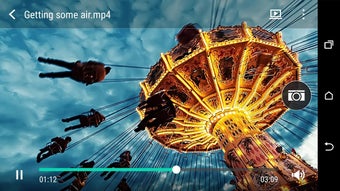
Description
Download HTC Service Video Player APK – video player, streaming, gesture controls, slow motion, subtitles, HTC, Android, free download
Overview
The HTC Service Video Player is a free Android application developed by HTC Corporation, designed to deliver smooth playback of both locally stored videos and internet streaming content. Built with strong decoding capabilities, the app ensures fluid video performance across a variety of formats and network conditions. It caters to general consumers seeking a reliable, no-frills video playback experience on their mobile devices. The software is particularly useful for users who value intuitive navigation and gesture-based controls for managing playback without interrupting their viewing session.
Target users include Android smartphone owners who frequently watch videos, whether from personal storage or online sources. The app supports a wide range of video formats, making it suitable for users with diverse media libraries. It also offers features such as subtitle support and the ability to extract still images from video clips, enhancing the overall media consumption experience. Real-world usage scenarios include watching downloaded movies, streaming content from web platforms, and sharing video moments with others through simple touch gestures.
HTC Corporation, known for its mobile device innovations, has positioned this tool as a streamlined, user-focused video solution. While no additional details about the developer’s broader software strategy were provided, the app’s focus on performance and ease of use suggests a commitment to enhancing the native Android media experience.
Key Features & Capabilities
- Fluid Video Playback – Leveraging robust decoding technology, the app delivers smooth playback for both high-resolution videos and streamed content, minimizing lag and buffering.
- Gesture-Based Controls – Users can fast-forward or rewind by swiping side to side with two fingers, enabling seamless navigation through video content without accessing menus.
- Multi-Finger Sharing – A swipe-up motion with three fingers allows quick sharing of media files with contacts or social platforms, streamlining content distribution.
- Still Image Extraction – The ability to capture still frames from videos is useful for preserving memorable moments or using them as thumbnails or wallpapers.
- Slow-Motion Speed Adjustment – On compatible devices, users can modify playback speed for slow-motion effects, enhancing video editing capabilities directly within the player.
- Wide Format Support – The app supports numerous commonly used video formats, ensuring compatibility with most media files found on Android devices.
- Subtitle Integration – Built-in support for subtitles allows users to enjoy foreign language content or improve accessibility during playback.
- Streaming Assistance – The player is optimized to handle streaming content efficiently, reducing playback interruptions and improving overall reliability.
These features collectively enhance the video viewing experience by combining performance, convenience, and intuitive interaction. The gesture controls, in particular, offer a modern and tactile way to manage playback, while the ability to extract stills and adjust speed adds value for casual content creators.
User Interface, Workflow & Performance
The HTC Service Video Player features an intuitive interface designed for ease of use across all user levels. Navigation is straightforward, with essential playback controls—play, pause, seek, volume, and brightness—positioned for quick access. The layout prioritizes visual clarity, ensuring that users can focus on content without distraction.
Workflow efficiency is enhanced by gesture-based interactions, which allow users to perform common actions without leaving the playback screen. For instance, two-finger swipes for fast-forwarding or rewinding provide a tactile, responsive experience. Similarly, the three-finger swipe for sharing enables rapid content distribution, ideal for social sharing during live events or casual viewing.
Performance observations are based on general software behavior patterns. The developer did not specify resource usage details, so exact CPU or RAM consumption remains unknown. However, the app’s focus on decoding efficiency suggests optimized performance for standard Android devices. Stability during extended playback sessions was not reported, but the app’s lightweight size of 25.8 MB indicates a minimal footprint on device storage.
Compatibility & System Requirements
The HTC Service Video Player is designed for Android operating systems. It is available in version 1.0.1 and has a file size of 25.8 MB. The app is distributed as an APK, making it accessible for installation on Android devices without requiring a third-party app store.
Platform compatibility information is limited. The developer did not provide additional system requirements, including minimum Android version or hardware specifications. As such, compatibility with specific devices or older Android versions cannot be confirmed. The slow-motion speed adjustment feature is noted to be available only on specific devices, suggesting that certain hardware capabilities are required for full functionality.
Installation is straightforward, and the app does not require additional runtime dependencies. Users are advised to ensure their device supports APK installations and that they enable installation from unknown sources if necessary.
Pros and Cons
Pros
- Free to download and use with no in-app purchases
- Supports a wide range of video formats and streaming content
- Intuitive interface suitable for users of all skill levels
- Gesture controls enhance navigation and interaction
- Ability to extract still images from videos
- Subtitle support improves accessibility and language flexibility
- Optimized for smooth playback and reduced buffering
- Lightweight at just 25.8 MB in size
Cons
- Slow-motion feature only available on specific devices
- Exact system requirements not provided by the developer
- Compatibility with older Android versions is unconfirmed
- No information on regular update frequency
- Performance under heavy load or extended use not documented
FAQ Section
Is HTC Service Video Player available for iOS devices?
The app is currently designed exclusively for Android operating systems and is not available for iOS devices.
Can I use this app to play videos from online sources?
Yes, the app supports streaming assistance, allowing users to play videos from internet sources with improved playback stability.
Is the app safe to download and install?
As a free Android application from HTC Corporation, the app is distributed through official channels and is considered secure. However, users should only install APKs from trusted sources.
Does the app require an internet connection to function?
While the app can play locally stored videos offline, streaming features require an active internet connection.
How often does the app receive updates?
The developer did not specify the update frequency. Users are advised to check for updates manually or through official distribution channels.
Final Thoughts
The HTC Service Video Player delivers a capable and user-friendly experience for Android users seeking a reliable video playback solution. With strong decoding performance, gesture-based controls, and support for multiple formats and subtitles, it meets the needs of everyday viewers and casual content sharers. Its lightweight design and free availability make it an attractive option for those looking to enhance their mobile video experience without added costs.
While some features are limited to specific devices and system requirements are not fully disclosed, the app’s overall functionality remains impressive for a free tool. It stands out for its intuitive design and focus on seamless interaction, particularly through gesture controls. For Android users who value simplicity, performance, and ease of sharing, this app offers solid value.
Download HTC Service Video Player now
Guides & Tutorials for HTC Service Video Player APK
How to install HTC Service Video Player APK
- Click the Preview / Download button above.
- Once redirected, accept the terms and click Install.
- Wait for the HTC Service Video Player APK download to finish on your device.
How to use HTC Service Video Player APK
This software is primarily used for its core features described above. Open the app after installation to explore its capabilities.
User Reviews for HTC Service Video Player APK 0
No reviews found





